



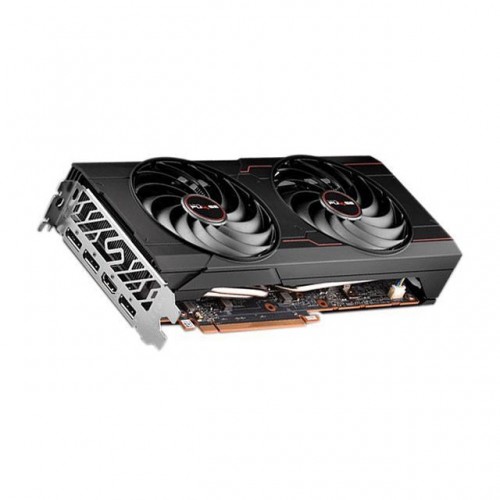
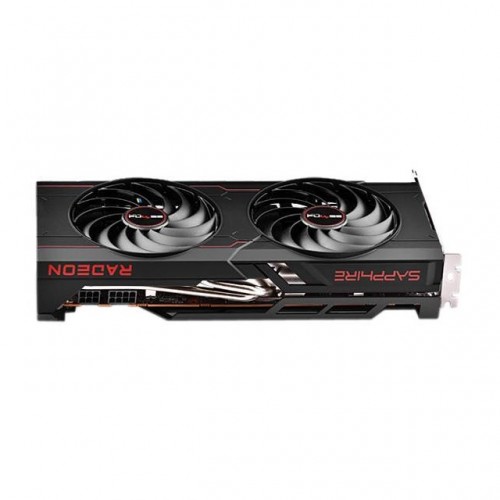
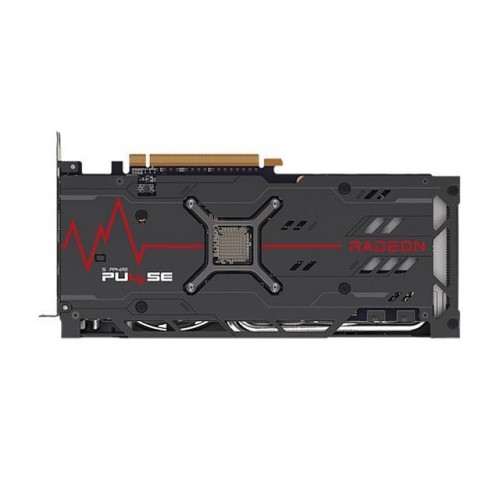
Sapphire Nitro PLUS AMD Radeon RX 6700 XT Gaming OC 12GB Graphics Card
Key Features
• MPN: 11306-05-20G
• GPU: Boost Clock: Up to 2620 MHz
• Memory: 12GB/192 bit DDR6. 16 Gbps Effective
• Stream Processors: 2560
• RDNA 2 Architecture
Specifications
| Video Memory Specifications | ||
| Type | GDDR6 | |
| Size | 12GB | |
| Resolution | 7680×4320 | |
| Core Clock | Boost Clock: Up to 2620 MHz Game Clock: Up to 2474 MHz |
|
| Memory Clock | 16 Gbps Effective | |
| Memory Interface | PCI-Express 4.0 | |
| Stream Processors | 2560 | |
| Others | Cooling: Dual Fans | |
| Interface | ||
| Display Port | 3x DisplayPort 1.4 | |
| HDMI | 1x HDMI | |
| Power Specifications | ||
| Connectors | 1 x 8-pin + 1 x 6-pin Power Connector. | |
| Recommended PSU | Minimum 650 Watt Power Supply | |
| Consumption | 230W (Board Power) | |
| Display Option | ||
| Multi Display | Maximum 4 Displays | |
| Application Programming Interfaces | ||
| DirectX | DirectX 12 Ultimate | |
| Physical Specifications | ||
| Dimensions | 260(L)X 119.85(W)X 49(H)mm | |
| Others | 2.2 slot, ATX | |
| Warranty | ||
| Manufacturing Warranty | 02 years warranty | |
Sapphire Nitro PLUS AMD Radeon RX 6700 XT Gaming OC 12GB Graphics Card
The Sapphire Nitro PLUS AMD Radeon RX 6700 XT Gaming OC 12GB Graphics Card For The Ultimate 1440p Gamer Seeking To Harness Breakthrough Graphics With Vivid Visuals And Excellent Quality Cooling Solutions. Rigged With Superior Components To Handle AAA Game Scenarios, The NITRO+ AMD Radeon™ RX 6700 XT Graphics Card Is A Crucial Component For An Incredible Gaming Experience. The Aesthetic Design Will Be A Beautiful Integration Into Any PC Build. SAPPHIRE NITRO+ Graphics Card FEATURES Explore All The Incredible Features That Come With The SAPPHIRE NITRO+ AMD Radeon™ RX 6700 XT Graphic Card. We’ve Split Our Features Into 3 Categories So You Can Easily See All The Features We Pride Ourselves In Designing To Create The Best Gaming Experience Possible For You Hybrid Fan Blade Traditional Axial Fan Is Quiet But Lacks Of The Air Pressure To Push Down The Air To The Components. Blower Fan Has Strong Air Pressure But Is Noisy At High Speed. The New Hybrid Fan Design Combines The Strengths By Improving The Downward Air Pressure Of Axial Fan Design While Keeping The Fan Noise Low. For Improved GPU Cooling Sapphire PLUS RX 6700 XT OC All-New Innovative Wave Fin Design Working In Tandem With Our V-Shape Fin Design For GPU Cooling Reduces Wind Friction. Software BIOS Switch Switch From Performance Mode To Silent Mode Or Back Using Our TriXX Software For A Quick And Easy Switch Between Your Dual BIOS Modes.
Sapphire Nitro PLUS AMD Radeon RX 6700 XT Gaming OC 12GB Review
Say a warm ‘hello’ to the Sapphire Nitro PLUS AMD Radeon RX 6700 XT Gaming OC 12GB Graphics Card, but be quick because it’s unlikely to be around for long. Like every other GPU right now, availability is scarce and pricing is vastly inflated. These woes aren’t unique to this card, so let’s not dwell too much on the market and instead look at how the Sapphire compares to other cards in its class. In six months, hopefully all these market shenanigans and forum discussions will be relegated to the ‘remember when’ category.
The Sapphire PLUS RX 6700 XT OC, along with all AMD Radeon RX 6700 XT(opens in new tab) cards, makes use of the new Navi 22 GPU. It contains 2,560 RDNA2 based shader cores with 96MB if Infinity Cache, plus a 192-bit memory bus that connects to 12GB of GDDR6 memory.
That’s a narrow bus for a card in this price range, but AMD claims that the large cache minimises this disadvantage. To be fair, that’s exactly what’s happened with all the other RDNA 2 GPUs we’ve seen. The RDNA2 architecture and 7nm process are shown off in all their glory with the Sapphire running at stunning 2,622MHz boost clock. AMD has done a fantastic job optimising its architecture to allow clock speeds at these levels without resorting to brute force, and borderline crazy power consumption.
Despite the relatively tame (by modern standards) 230W TDP of the Navi 22 GPU, the Sapphire Nitro+ makes use of a large 2.5 slot triple fan cooler. There’s a large cut out on the rear of the card to allow air to pass through it, a trend that is becoming more apparent in modern shrouds. It comes equipped with three DisplayPort connections, plus a single HDMI 2.1 port.
If you like a bit of RGB bling, the Sapphire Nitro+ has you covered, with a nice-looking light bar and Sapphire logo across the top of the card, joined by a logo on the back plate. We noted that our particular card was good at producing orange. Some RGB products really struggle to show an accurate orange. Okay, that’s hardly a top selling point, but… Orange!
Sapphire PLUS RX 6700 XT OC PCB is surprisingly compact compared to the cooler. The nine phase design is powered by six- and eight-pin power connectors, providing up to 300W of power delivery. There’s also dual BIOS, though the clocks are the same with both. Sapphire says the quiet BIOS lowers the fan speed a touch, though honestly, we couldn’t tell the difference between them. Maybe on a 350W card this would have some more practical use.
There’s a third setting that lets you switch between them using Sapphire’s Trixx software app. Additionally there’s an ARGB header than allows you to sync other RGB devices with the card.
Sapphire has done a great job with its cooler. We saw a load temperature of just 64°C, which is outstanding for a 230W TDP card. The design is aggressive and the metal back plate gives off an ’80s sci-fi vibe. In addition to the main cooler, Sapphire adds a separate secondary heat sink to cool the memory. It has a large surface area thanks to its finned design and it’s a thoughtful and highly effective design.
So how does it perform? Honestly, AMD was a little rosy with its pre-launch predictions. We see the card trailing the Nvidia GeForce RTX 3070(opens in new tab) but competitive with the GeForce RTX 3060 Ti(opens in new tab). And the Sapphire card’s clocks aren’t enough of an increase over the reference card to make a meaningful difference in frame rates.
It will, however, run any game at 1440p and smash out the frames at 1080p when driving a high refresh rate monitor. The Nitro+ RX 6700 XT , and all other RX 6700 XT cards for that matter lag noticeably in ray tracing performance and we’ll have to wait a little longer to see AMD’s equivalent DLSS implementation.
When all is said and done, though, sadly your choice of card will actually come down to what’s in stock the particular second you happen to refresh your favourite retailer’s page. A win by a frame here or a frame there doesn’t matter if you can’t buy one over the other.
Overclocking modern GPUs generally isn’t as beneficial as it was in the past, but free performance is free, so why not give it a go?
Our testing was simple. The power limit was increased to its maximum +15% and the memory to its frustratingly limited maximum of 2,150MHz from the default 2,000MHz. Our sample was happy to run at a set clock of 2,850MHz, with a real average clock of 2,765MHz observed over a 10-minute 3DMark loop.
Real performance was measured using Metro: Exodus at 1440p. The default clocked Nitro+ delivered 70.3 FPS compared to the overclocked card which ran at 74.6 FPS. That’s not an insignificant gain, but not a game changer either.
SAPPHIRE NITRO PLUS GRAPHICS CARD LIST
Be the first to review “Sapphire Nitro PLUS AMD Radeon RX 6700 XT Gaming OC 12GB Graphics Card”
Related products

Components

Components
Components
Components
Components

Components
Reviews
There are no reviews yet.