

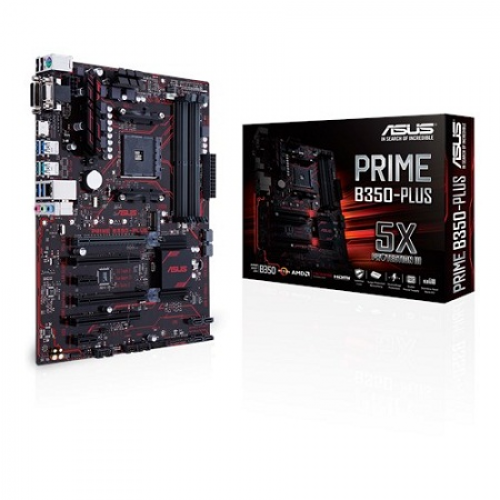
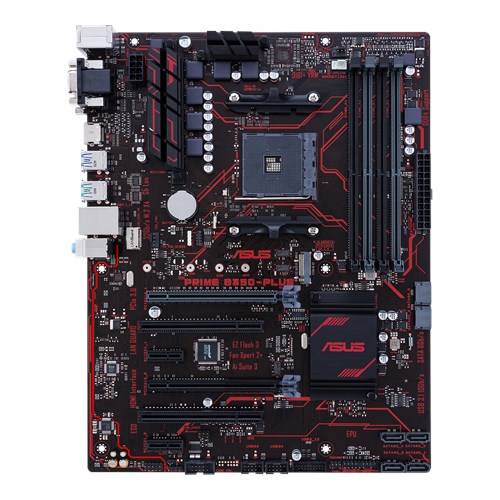

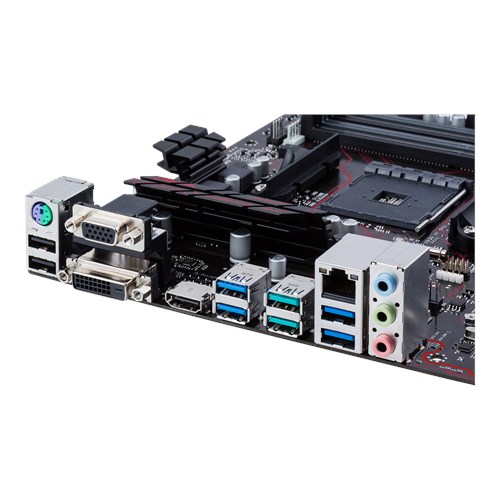
Asus PRIME B350-PLUS AMD AM4 ATX Motherboard
9,300.00৳
Key Features
- AMD B350
- AMD AM4 Socket for AMD Ryzen/ 7th Generation A-series
- DDR4 3200(O.C.)
- 1 x PCIe 3.0/2.0 x16 (x16 mode)
Asus PRIME B350-PLUS AMD AM4 ATX Motherboard
- 5X Protection III: Multiple hardware safeguards for all-round protection
- LED illumination: Lighting control for both PCIe slot and audio trace paths
- Native M.2: Lightning-fast storage speeds
- Onboard USB 3.1: Latest connectivity for ultrafast 10Gbps transfers
- One-stop controls: Media-acclaimed UEFI BIOS with EZ Flash 3
Asus Prime B350-PLUS Review
This Asus PRIME B350-PLUS lower price means it has one of AMD’s more affordable chipsets. Don’t think that Asus has used the cheapest bit of silicon it can find, though – the B350 sits in the middle of the range, below the X370 but above products that are designed for budget boards and small-form-factor slates.
The means the B350 chipset still has solid features. It supports dual-graphics, albeit only for AMD Radeon hardware, and it caters for all of the usual RAID levels and CPU overclocking.
In other areas, though, it’s a little cut down. It supports four native SATA ports rather than six, and two USB 3.1 ports – three times fewer than in the range-topping X370 chipset.
Many Intel boards will have more connectivity, too. Even mid-range boards tend to have six SATA ports and four USB 3 connectors, and this board has one M.2 port – while many Intel offerings include two.
If you do opt for this board, make sure you use a Ryzen processor, as the extra power and PCI lanes delivered by the fresh silicon means you can use faster M.2 SSDs and DDR4 memory when compared to older A-series APUs.
This affordable AMD board is fine elsewhere, although it rarely pushes the envelope. The peak memory speed of 3200MHz with Ryzen chips is fine, but other AMD processors and APUs see that figure decline to 2400MHz. It doesn’t have USB 3.1 type-C on its backplate, and there are only three audio output jacks.
It has one full-speed PCI-Express x16 slot and one slower, so dual graphics are out – but, unusually, it has two standard PCI sockets alongside its two PCI-Express x1 ports. That’s rare these days, and it’s great for older expansion cards.
There are no on-board buttons or displays, and the rest of the board hardly catches the eye. I like its black PCB, and it’s covered with red lines and accents, but its heatsinks are tiny and there aren’t any RGB LEDs – only crimsons lights. The board only has three fan headers, which is fine for a basic rig but not ideal if you need more cooling .
It’s only got basic audio and networking, too, and no Wi-Fi.
There aren’t any extras on this board, but that’s less important – and less damning – on such an affordable slab of PCB.
Performance
It’s no shock that this affordable board and its mid-range specification returned a middling set of benchmark results.
Its single- and multi-core application scores of 4502 and 23,419 are among the poorest I’ve seen from a Ryzen motherboard, and its CrystalDiskMark speeds are similarly underwhelming.
That doesn’t bode well for top-tier performance, but remember that we’re talking fine margins that won’t make a huge amount of difference to most applications in the real world.
It’s a similar story in gaming benchmarks, where the Asus’ 3D Mark score of 6907 is a little way behind the best gaming motherboards.
The Asus clawed some ground back in power tests. Its peak power draw of 120W is middling, but it achieved a table-topping idle draw of 56W. That’s important, because this board will likely spend more time at that end of the scale than near to its peak performance levels.
Be the first to review “Asus PRIME B350-PLUS AMD AM4 ATX Motherboard”
Related products
Components
Components
Components

Components
Components
Reviews
There are no reviews yet.